Application Prototype
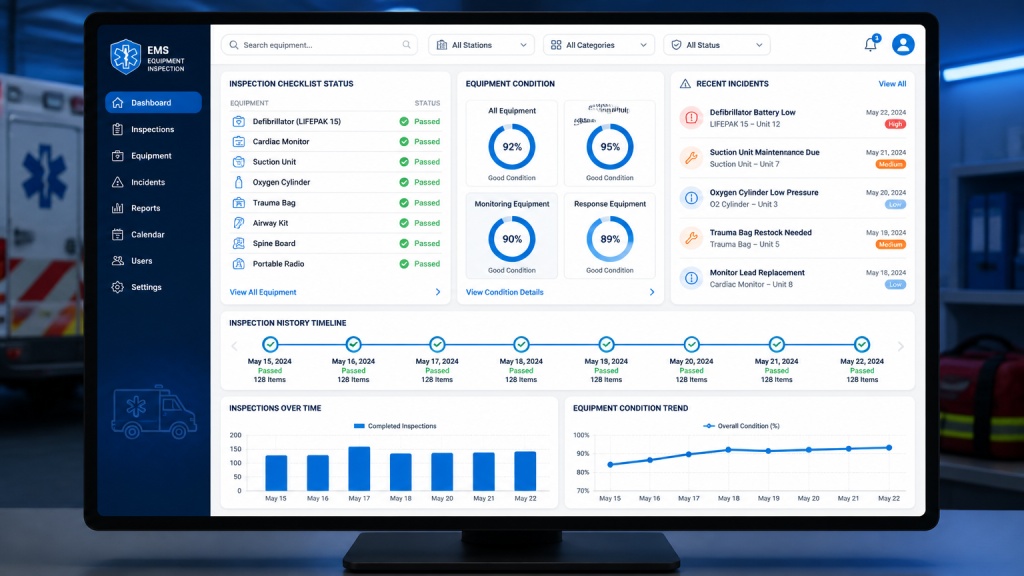
One Centralized Workflow Turns Inspection Data into Action
Provide EMS personnel with a centralized digital system for completing equipment inspections and reporting equipment problems.
Main Features
Digital Inspection Checklist
Pass / Fail / Maintenance
Incident Reporting
Inspection History
Equipment Status Tracking
Supervisor Dashboard
Search & Filtering
Basic Analytics
Example Workflow
Login
Sign in to the EMS inspection portal.
Select Equipment
Pick the unit to inspect from the equipment list.
Complete Inspection
Work through the digital checklist and mark each item.
Report Problems
Flag any equipment issues and submit incident details.
Submit
Send the completed inspection and incident reports.
Review History
Inspectors and supervisors review past records.
Interactive Prototype
Try a simple checklist interaction below. This demonstrates how an inspector could record an equipment condition.
Cardiac monitor
Oxygen cylinder
Trauma bag
Select a status to preview the interaction.
Test the Working Prototype
Complete an inspection, flag an equipment issue, validate required notes, and submit a sample readiness record.